



About Us
How MQTT Printing Works: A Cloud Printing Solution for Restaurants and Logistics
How can an online ordering platform send orders directly to a restaurant printer without requiring a computer to manage every print job?
MQTT cloud printing makes this possible by connecting business applications with network-enabled printers through an MQTT broker.
For restaurant chains, food delivery platforms, and logistics companies, this technology provides a flexible way to automate printing across multiple locations.
In this article, we explain how MQTT printing works and how LOYALTY-SECU's 80mm cloud thermal printer can support different business applications.
1. What Is MQTT Printing?
MQTT (Message Queuing Telemetry Transport) is a lightweight messaging protocol widely used in IoT and connected-device applications.
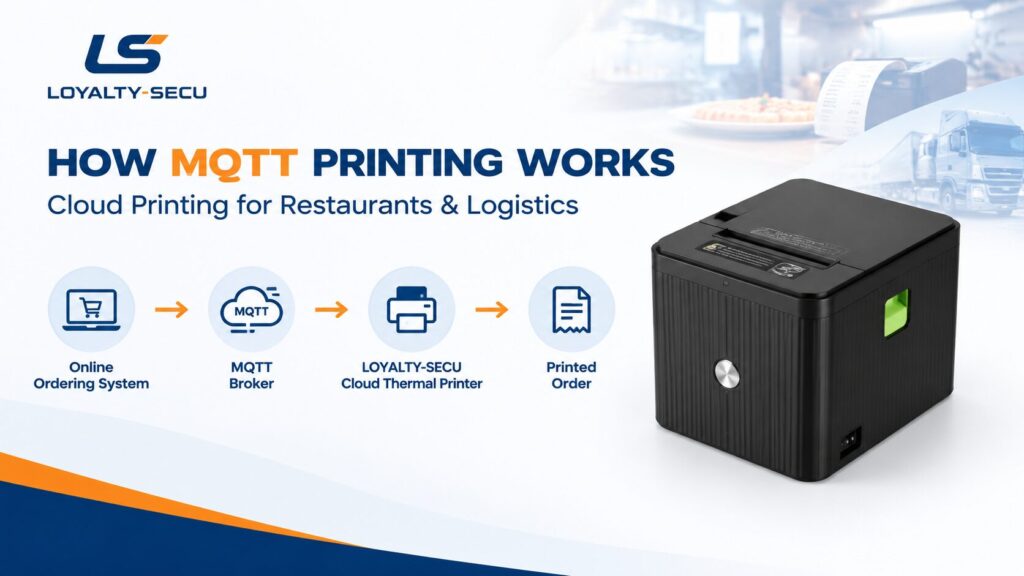
In an MQTT printing system, a business application sends print-job messages to an MQTT broker. A compatible cloud printer subscribes to the relevant topic, receives the message, processes the supported print data, and prints the required information.
Unlike traditional USB printing, MQTT cloud printing can deliver print jobs to remote printers over an Internet connection.
2. How Does MQTT Printing Work?
A typical MQTT printing workflow involves four steps:
Step 1: Generate a Print Job
A restaurant ordering system, POS platform, or logistics application generates order details or other information that needs to be printed.
Step 2: Send the Message to an MQTT Broker
The application publishes the print-job data to a designated MQTT topic.
Step 3: Deliver the Message to the Printer
The MQTT broker forwards the message to the compatible printer subscribed to that topic.
Step 4: Print Automatically
The printer processes the received data according to its supported format and prints the order ticket, receipt, or other document.
This setup allows businesses to connect their software with printers at remote locations without relying solely on a traditional local printing connection.
3. Where Can MQTT Cloud Printing Be Used?
Restaurant Chains and Online Ordering
For pizza chains and restaurants, incoming orders need to reach the kitchen quickly and accurately.
An MQTT cloud printing solution can connect an online ordering platform with printers installed at individual restaurants, helping staff receive order tickets without manually transferring order information.
LOYALTY-SECU has supplied 80mm cloud thermal printers for an international pizza chain's ordering workflow. The deployment connects the customer's self-hosted MQTT broker on AWS with kitchen printers, allowing orders generated through the restaurant's WhatsApp ordering system to be printed directly.
Food Delivery Platforms
Restaurant software providers and food delivery integrations can use cloud printing to route order information to compatible printers at participating restaurants.
For example, a system serving restaurants that process Uber Eats orders may integrate a cloud printer into its existing order-management workflow. Actual compatibility depends on the software platform and integration configuration.
Logistics and Warehouse Operations
Logistics companies can use cloud-connected thermal printers to print transaction receipts, operational tickets, and other documents generated by their business applications.
LOYALTY-SECU has also supplied cloud printing solutions to a U.S. logistics company, demonstrating the potential of this technology beyond the restaurant industry.
4. LOYALTY-SECU 80mm MQTT Cloud Thermal Printer
The LOYALTY-SECU LY-TRP-486 Series is designed for businesses that need network-connected thermal printing and software integration.
Key features include:
With suitable software integration, the printer can support cloud printing workflows for restaurants, food delivery systems, retail applications, and logistics operations.
Explore the product: LOYALTY-SECU 80mm Smart Cloud Thermal Printer – LY-TRP-486 Series
5. Looking for an MQTT Printing Solution for Your Business?
Every cloud printing project has different requirements. The right solution depends on your software architecture, MQTT broker, message format, network connection, and printing workflow.
LOYALTY-SECU works with business customers to evaluate printer configurations and integration requirements for their applications.
Whether you are developing restaurant ordering software, managing multiple stores, or building a logistics platform, our team can discuss a suitable cloud thermal printing solution for your project.
Contact LOYALTY-SECU to discuss your MQTT cloud printing requirements.
Frequently Asked Questions
What is MQTT printing?
MQTT printing uses an MQTT messaging system to deliver print-job data from a business application to a compatible network-connected printer.
Does MQTT printing require a local computer?
Not necessarily. A compatible cloud printer can receive print jobs directly through its network connection after the system has been configured.
Can MQTT printing work over 4G?
Yes, if the printer supports 4G connectivity and can connect to the configured MQTT broker.
Can MQTT printing work with existing business software?
Potentially, yes. Integration depends on the software's messaging capabilities, the printer's supported formats, and the system configuration.